

Follow these simple steps to get your ad back online:
- Log in to your account.
Use the same login info you used when you originally posted the ad. - Navigate to your listings.
After logging in, you’ll land on the “Classifieds” section (not “Rallies”).
Click on “Listings” in the menu. - Find your expired ad.
Look for your “Inactive” listing and click the pencil (edit) icon next to it. - Choose a plan.
You’ll be prompted to select a new ad plan.
On the next screen, you can also make any updates or changes to your listing. - Submit and save.
Scroll to the bottom, enter your promo code (VCTSALE), and submit your ad.
And that’s it—you’re back in business!
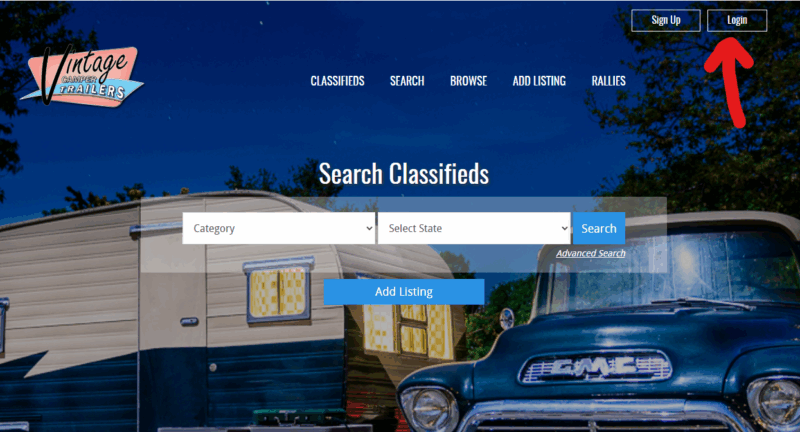
Use the same login info you used when you originally posted the ad.
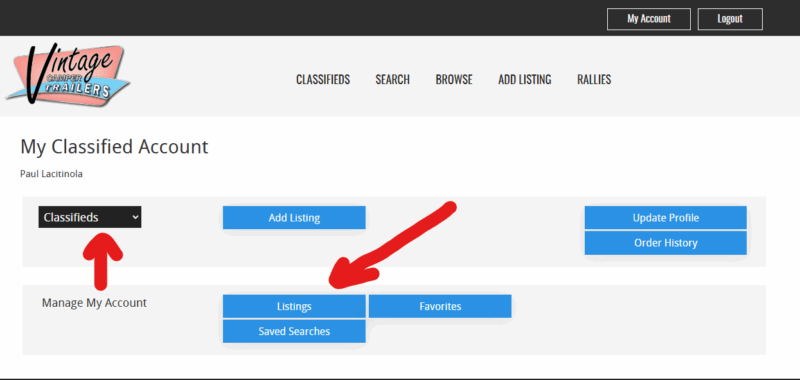
After logging in, you’ll land on the “Classifieds” section (not “Rallies”).
Click on “Listings” in the menu.
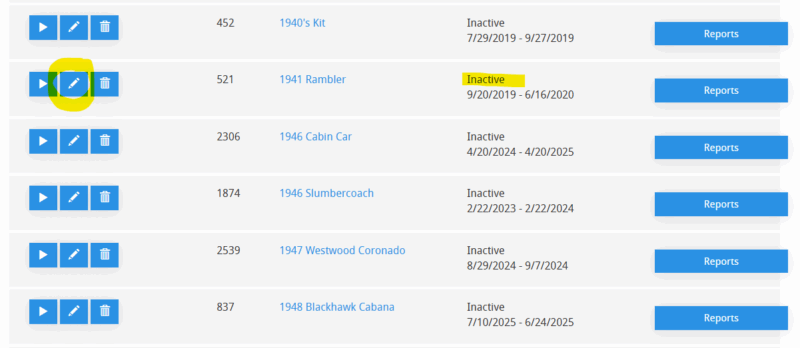
Look for your “Inactive” listing and click the pencil (edit) icon next to it.
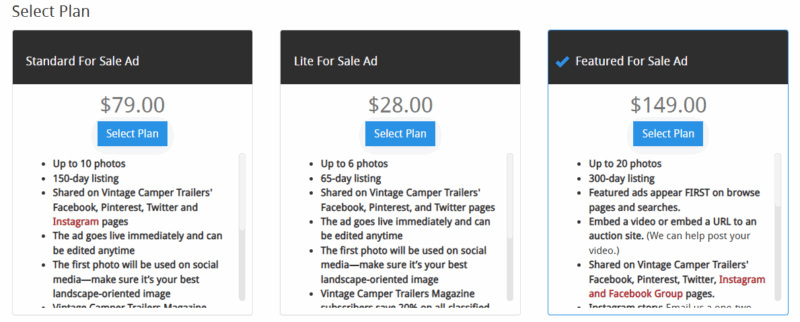
You’ll be prompted to select a new ad plan.
On the next screen, you can also make any updates or changes to your listing.
Submit and save.
Scroll to the bottom, enter your promo code (VCTSALE), and submit your ad.
